The Component Nobody Watches Until Everything Stops: How to Recognize a Failing Motherboard Before It Takes Your System Down
Ask most computer users to name the parts inside their machine, and you will hear about processors, hard drives, and graphics cards. The motherboard rarely enters the conversation—until it fails. At that point, it becomes the only thing anyone can talk about, usually because everything else has stopped working along with it.
That dynamic is worth examining carefully, because the motherboard is not simply one component among many. It is the physical and electrical foundation upon which every other piece of hardware depends. When it goes, it rarely goes quietly.
What a Motherboard Actually Does
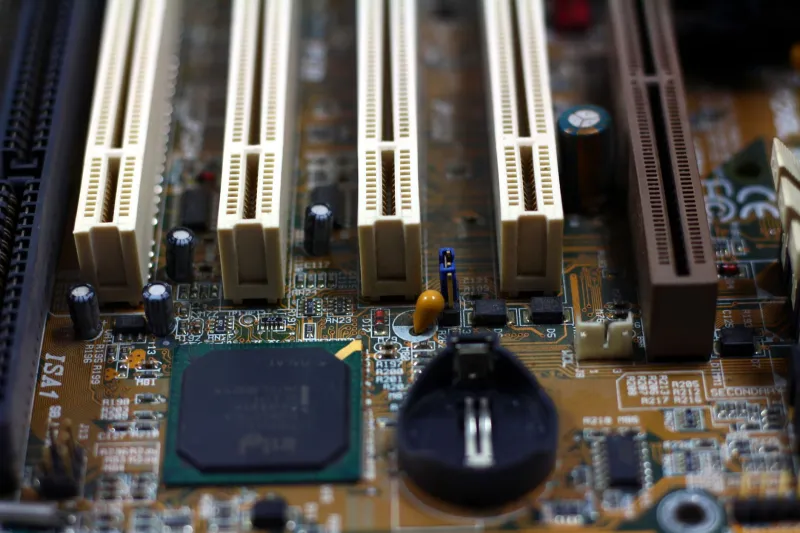
At its most basic, the motherboard is a large printed circuit board that connects and coordinates every major component in your system. Your processor sits in a socket mounted directly to it. Your RAM slots into it. Your storage drives, graphics card, network adapter, and USB ports all communicate through it. Power from your supply is regulated and distributed by it.
More importantly, the motherboard manages the flow of data between all of these components through a series of pathways called buses and chipsets. A modern motherboard is not a passive connector—it is an active participant in nearly every operation your computer performs. That is why a subtle problem on the board can manifest in wildly unpredictable ways: random shutdowns, corrupted files, unrecognized hardware, or a machine that simply refuses to boot.
Why Motherboards Fail: The Most Common Culprits
Capacitor Degradation
If you have heard of "capacitor plague," you already know that this was a widespread problem in the early 2000s when a rogue electrolyte formula found its way into millions of manufactured capacitors. Boards from that era developed bulging or leaking capacitors that caused instability and eventual failure. While the specific scandal has passed, capacitor degradation remains a genuine concern today—particularly in budget-tier boards, aging systems, and machines that run in hot environments. Capacitors regulate voltage and filter electrical noise; when they weaken, the power delivery to your CPU and RAM becomes erratic, producing symptoms that look like software problems until they become hardware failures.
Power Delivery Issues
The voltage regulator modules (VRMs) on a motherboard are responsible for converting the power supply's output into the precise voltages your processor requires. Enthusiast-grade and workstation boards tend to invest heavily in robust VRM designs, while entry-level boards may cut corners in this area. Under sustained load—particularly in machines running demanding applications or left on continuously—underspecified VRMs can overheat, degrade, and eventually fail. This is especially relevant for small business owners who run servers or workstations around the clock.
Bent or Damaged CPU Pins
On platforms that place the delicate contact pins inside the CPU socket on the motherboard rather than on the processor itself—common in Intel desktop platforms—a single bent pin can cause an entire system to fail to POST (Power-On Self-Test). This type of damage typically occurs during CPU installation or removal and can be extremely difficult to detect without close inspection. The consequences range from one non-functional USB port to a completely dead system, depending on which pin is affected.
Environmental and Electrical Stress
Moisture, dust accumulation, and power surges are among the most underappreciated causes of premature motherboard failure in the United States, where older building wiring and seasonal humidity variations are common. Dust acts as an insulator that traps heat around sensitive components. Moisture creates conductive bridges between circuits that should never touch. Power surges—especially in areas prone to summer thunderstorms—can overwhelm even high-quality surge protectors and deliver damaging voltage spikes directly to the board.
Warning Signs You Should Not Ignore
Motherboard failure is rarely instantaneous. In most cases, the board telegraphs its deteriorating condition well in advance. The challenge is knowing what to look for.
Random, Unexplained Reboots or Shutdowns If your system restarts without warning and without a consistent trigger—not during a specific application, not at a particular temperature—the motherboard's power delivery or voltage regulation may be losing stability. Rule out the power supply first, but if PSU testing comes back clean, the board deserves serious scrutiny.
POST Failures and Diagnostic Beep Codes Most motherboards include a speaker header or onboard LED indicators specifically for this purpose. If your machine fails to reach the operating system and emits a series of beep codes or flashes error lights, consult your board manufacturer's documentation. These codes are designed to isolate the failing subsystem and can point directly toward a motherboard-level fault.
Peripheral Devices That Stop Working Inconsistently A USB port that works one day and not the next, a keyboard that requires multiple reconnection attempts, or a network adapter that drops off the system intermittently—these are not always driver problems. They can indicate failing controller chips or damaged traces on the motherboard itself.
Memory Errors and Blue Screens While RAM sticks can certainly fail on their own, memory errors that persist after replacing or reseating RAM modules often point to a problem with the memory slots or the memory controller, both of which are integrated into the motherboard or processor. Running the Windows Memory Diagnostic tool or MemTest86 can help isolate whether the fault lies with the RAM or the board.
Visible Physical Damage When was the last time you looked at your motherboard? Bulging capacitors—identifiable by a domed or cracked top rather than a flat one—are a definitive sign of impending failure. Burn marks, corroded contacts, or discoloration around voltage regulator components are equally serious indicators that should prompt immediate professional evaluation.
Diagnosing the Problem Methodically
Motherboard diagnosis requires a systematic approach, because so many symptoms overlap with those of other failing components. At MEC Computer, our diagnostic process begins by eliminating the variables: testing the power supply with a dedicated PSU tester, reseating all components, booting with only essential hardware installed, and checking BIOS/UEFI for error logs and hardware monitoring data.
For business environments, this process is time-sensitive. A machine that cannot boot represents lost productivity, and attempting aggressive self-repair without proper tools or training can transform a recoverable situation into a total loss. Professional diagnosis is particularly important when data recovery is a concern, since some motherboard failures can make drives temporarily inaccessible even when the drives themselves are undamaged.
What Premature Failure Often Reveals
When a motherboard fails significantly before its expected lifespan—typically seven to ten years under normal conditions—it is worth asking why. Manufacturing defects, counterfeit components in the supply chain, inadequate cooling within the case, and chronic power quality issues are all factors that can shorten a board's life dramatically.
For small business owners, a premature motherboard failure in multiple machines can signal a systemic problem: poor power conditioning in the office, inadequate ventilation in server closets, or a purchasing pattern that has repeatedly favored underspecified hardware. Addressing the root cause is always more cost-effective than replacing boards one at a time.
The Takeaway
The motherboard does not announce itself during the good times. It operates invisibly, doing its job while users focus on the software and peripherals it supports. But ignoring it entirely is a risk that home users and business owners alike cannot afford to take. Periodic visual inspections, attentiveness to the early warning signs described above, and a willingness to seek professional assessment when symptoms appear can extend the life of this critical component—and prevent the kind of sudden, total failure that no one is ever truly prepared for.