Why Your First Instinct After a Hard Drive Failure Could Cost You Everything
Few experiences are more alarming than powering on your computer and discovering that critical files have vanished, a drive is no longer recognized, or an ominous clicking sound has replaced the quiet hum of a healthy system. The instinct to act fast is natural — to Google a fix, download a recovery tool, or attempt a restart cycle in hopes the problem resolves itself. Unfortunately, that instinct is frequently responsible for turning a recoverable situation into a permanent one.
At MEC Computer, our technicians work with storage failures on a regular basis. The patterns we observe are remarkably consistent: by the time many clients reach us, the original failure has been compounded by a series of well-meaning interventions that narrowed or eliminated recovery options entirely. This article examines why that happens, what the science of data loss actually looks like, and how to make smarter decisions when your storage device is in distress.
How Storage Failures Actually Happen
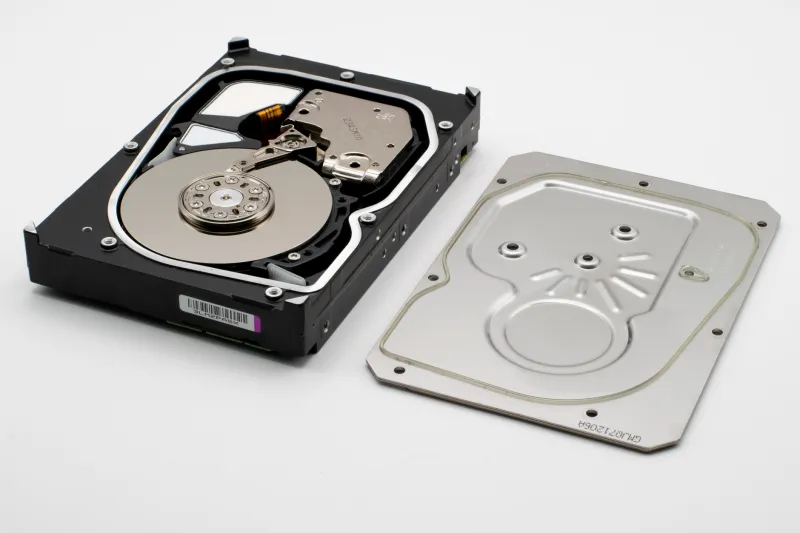
To understand why DIY recovery attempts so often backfire, it helps to understand how data is stored and how failures originate. Modern hard disk drives (HDDs) store data on spinning magnetic platters read by an actuator arm with a read/write head that floats nanometers above the platter surface. Solid-state drives (SSDs) store data in NAND flash memory cells without any moving parts. Each architecture fails differently, and each demands a different response.
HDD failures generally fall into two categories: logical and physical. Logical failures involve corrupted file systems, deleted partitions, or software-level errors — the drive hardware itself remains intact. Physical failures involve mechanical damage: failed read/write heads, seized spindle motors, degraded platters, or damaged firmware chips. SSDs, meanwhile, can experience controller failures, worn NAND cells, corrupted firmware, or electrical damage.
The severity of the failure and its root cause determine what recovery is possible — and which actions will make recovery impossible.
The Case Files: When Good Intentions Go Wrong
Over the years, our team has documented recurring scenarios where client intervention prior to seeking professional help dramatically worsened outcomes. Three patterns stand out with particular frequency.
The Repeated Restart Cycle A client in a small accounting firm noticed their desktop was running unusually slow and occasionally freezing. Assuming a software glitch, they restarted the machine repeatedly over the course of a day. What they were actually experiencing was the early stages of read/write head degradation — a physical failure. Each restart forced the heads to park and re-engage across a platter surface that was already compromised. By the time the drive was brought to us, the platter had sustained significant additional scoring, and a recovery that would have been straightforward at day one required clean-room intervention at substantially greater cost.
The Recovery Software Trap A freelance photographer discovered that an entire project folder had disappeared from an external drive. They immediately downloaded a popular free recovery application and ran it — twice — against the failing drive. The software wrote temporary files and recovery indexes back to the same drive it was scanning. On a drive that was already experiencing sector instability, this additional write activity overwrote portions of the very data they were trying to recover. We were able to retrieve roughly 60 percent of the original files. The remainder was gone.
The Freeze and Thaw Myth Perhaps the most persistent piece of folk wisdom circulating online is the idea that placing a failing hard drive in a freezer temporarily contracts its components and allows a final read. This technique originated from a period when drive construction tolerances were considerably different. Applied to a modern drive, particularly one with active head or platter damage, freezing introduces condensation risk and can cause further mechanical stress. One client brought us a drive that had been frozen overnight. The condensation that formed when it warmed had reached the internal platter assembly. Recovery was not possible.
The Science of Making It Worse
Each of these scenarios illustrates a core principle: a failing storage device is not a static object. Every interaction — every power cycle, every read/write operation, every physical manipulation — changes its state. In many cases, the original failure leaves data largely intact on the physical medium. The subsequent actions are what destroy it.
In the case of physical HDD failures, continued operation forces damaged heads across platter surfaces, creating new damage with each revolution. In logical failures, recovery software that writes to the affected volume can permanently overwrite the file table structures needed to reconstruct lost data. Even connecting a failed SSD to a powered system can trigger garbage collection processes in the controller firmware that delete what the system perceives as invalid data — data that a professional recovery process could otherwise extract.
Professional data recovery in genuine failure scenarios is conducted under controlled conditions: clean-room environments for physical drive work, write-blocked forensic imaging for logical failures, and specialized firmware tools that bypass standard operating system interaction entirely. These methods preserve the state of the medium rather than altering it.
A Decision Framework for Storage Emergencies
Not every storage problem requires immediate professional intervention. The following framework can help you determine the appropriate response without inadvertently causing further damage.
When safe self-troubleshooting may be appropriate:
- The drive is recognized by the operating system and appears in Disk Management or Disk Utility
- The issue is limited to a single deleted file or folder with no signs of hardware distress
- No unusual sounds (clicking, grinding, or repeated seeking) are present
- The drive has not experienced a physical impact or power surge
- You have a verified backup and the goal is convenience rather than critical recovery
In these lower-risk scenarios, checking the Recycle Bin, reviewing cloud sync history, or using reputable recovery software on a separate target drive (never the source) may be reasonable first steps.
When you should stop and contact professionals immediately:
- The drive produces clicking, grinding, or repetitive seeking sounds
- The drive is not recognized by the BIOS or operating system at all
- The device has been dropped, exposed to liquid, or subjected to electrical damage
- A previous recovery attempt has already been made without success
- The data involved is business-critical, legally significant, or irreplaceable
- The drive is making noise and you have no current backup
In these scenarios, every additional action you take reduces the probability of successful recovery. Powering the drive down and leaving it powered down until a professional can evaluate it is the single most protective action available to you.
What Professional Recovery Actually Looks Like
At MEC Computer, our initial evaluation of a failing drive is non-destructive. We assess the failure type, estimate recovery feasibility, and provide a clear picture of what can realistically be retrieved before any recovery work begins. For physical failures, we work with certified clean-room partners equipped to handle head replacements, platter transfers, and firmware-level repair. For logical failures, we use forensic imaging tools that create a sector-by-sector duplicate of the drive before any recovery software is applied — preserving the original state regardless of what the recovery process encounters.
This approach exists precisely because the original failure is rarely the deciding factor in whether data is recovered. What happens between the moment of failure and the moment a professional takes custody of the drive is often what determines the outcome.
The Most Valuable Step You Can Take Right Now
The best protection against catastrophic data loss is not knowing how to recover data — it is ensuring that recovery is rarely necessary. A reliable, regularly tested backup strategy — whether cloud-based, local, or both — removes the desperation that drives most harmful DIY recovery attempts. When you know your data exists somewhere else, the pressure to act immediately on a failing drive disappears, and rational decision-making becomes possible.
If you are currently facing a storage failure and are uncertain how to proceed, contact MEC Computer before taking further action. The conversation costs nothing. The alternative may cost you everything.