The Slow Suffocation: What Dust and Debris Are Quietly Doing to Your Computer
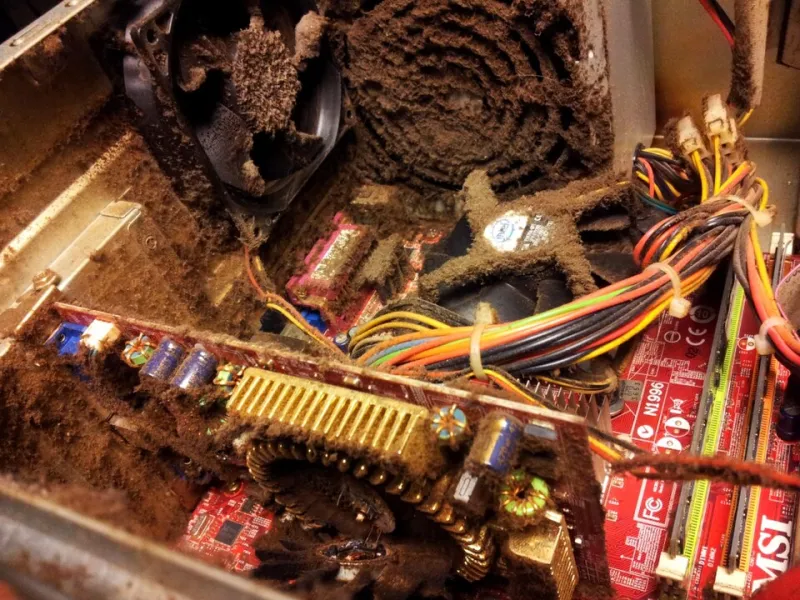
Photo: Arvutistuudio, CC BY-SA 4.0, via Wikimedia Commons
Of all the threats to a computer's long-term health, dust is perhaps the most consistently underestimated. It does not announce itself with an error message or a sudden crash. It accumulates silently, week after week, until the cumulative effect becomes impossible to ignore — usually at the worst possible moment.
For many households and small businesses across the United States, the interior of a desktop tower or laptop chassis has never been cleaned. Not once. The result is a layer of compacted debris that insulates heat-generating components, restricts airflow, and slowly degrades the hardware that keeps operations running.
Why Dust Is a Thermal Problem First
Modern computer components generate substantial heat during normal operation. The processor alone can reach temperatures exceeding 185°F under load. Dedicated graphics cards, power supplies, and voltage regulators all contribute additional thermal output. The entire cooling system — fans, heat sinks, and thermal paste — exists for one purpose: to move that heat away from sensitive components as efficiently as possible.
Dust disrupts this process at multiple points simultaneously. When it accumulates on fan blades, the fan must spin faster to move the same volume of air, increasing noise and mechanical wear. When it settles on heat sink fins, it forms an insulating barrier between the metal and the air flowing through it — the equivalent of wrapping a radiator in a blanket. When it coats intake vents, it restricts the volume of cool air entering the system entirely.
The result is a gradual rise in operating temperatures. Components respond to elevated heat by reducing their clock speeds through a process called thermal throttling, which directly degrades performance. Sustained high temperatures accelerate electromigration in processor circuits, degrade capacitors on the motherboard, and shorten the lifespan of the power supply.
The Pet Hair Problem
Households with dogs or cats face a more aggressive version of this challenge. Pet hair does not simply settle on surfaces the way fine dust does — it weaves itself into fan blades, wraps around heatsink fins, and mats across intake vents in dense layers that compressed air alone may not fully dislodge. A desktop computer in a home with a shedding dog can accumulate in six months what a pet-free environment accumulates in two years.
This is not a minor distinction. At MEC Computer, we regularly service machines where pet hair has formed a complete barrier across the CPU cooler, reducing airflow to near zero. In several cases, processors were operating at temperatures that would have triggered automatic shutdown within weeks, had the machines not been brought in for service first.
Environmental Factors That Accelerate Accumulation
Beyond pets, several environmental conditions accelerate dust buildup inside computers:
- Floor placement: Computers positioned directly on carpet or flooring sit in the highest-concentration dust zone in any room. Elevating a desktop tower even a few inches reduces particulate intake significantly.
- High-traffic areas: Machines located in hallways, near entryways, or in workshop environments are exposed to far greater particulate loads than those in quieter spaces.
- Forced-air heating and cooling systems: HVAC circulation distributes fine particles throughout interior spaces continuously. Homes or offices with older duct systems or infrequently replaced filters introduce more airborne debris.
- Carpeted floors: Carpet fibers break down over time and become a source of fine particulate matter that is easily drawn into computer intake vents.
- Smoking environments: Tobacco smoke residue does not simply accumulate — it bonds to surfaces inside the chassis, creating a sticky layer that traps additional particles and is considerably more difficult to remove than standard dust.
A Seasonal Maintenance Checklist
The appropriate cleaning interval depends heavily on the environment, but a general schedule provides a useful baseline:
Every three to four months:
- Use compressed air to clear intake and exhaust vents on laptops and desktops.
- Wipe down external surfaces and keyboard surfaces.
- Check that desktop towers are not in contact with carpet or flooring.
Every six months:
- Open the desktop chassis and use compressed air to clear dust from fans, heatsinks, and the motherboard surface. Always hold fan blades stationary while applying compressed air to prevent overspinning the bearings.
- Check that all cable runs inside the case are not obstructing airflow paths.
- Inspect the power supply vent for visible dust accumulation.
Annually:
- Reapply thermal paste between the CPU and its cooler. Thermal paste degrades over time, and a fresh application can reduce processor temperatures by 10°C or more on older systems.
- Inspect fan bearings for wobble or unusual noise, which indicates impending failure.
- Clean laptop cooling vents using a fine brush in addition to compressed air, as laptop heat sinks are more susceptible to compacted debris.
When Professional Cleaning Becomes Cost-Effective
For laptops in particular, accessing the internal cooling system requires disassembly that carries a real risk of damage for users unfamiliar with the process. Ribbon cables, fragile connectors, and proprietary fasteners make laptop maintenance meaningfully more complex than desktop cleaning. A professional cleaning service that includes thermal paste replacement and full disassembly typically costs between $60 and $120 — a figure that becomes highly rational when weighed against the cost of a replacement cooling assembly, a failed processor, or data recovery following a heat-induced drive failure.
The calculation shifts further when considering business continuity. A workstation that fails due to preventable thermal damage does not simply cost the price of repairs — it costs the productivity of whoever depends on it, the time required for data recovery or system restoration, and potentially the loss of work that was not backed up.
What Proper Maintenance Actually Looks Like
Before-and-after comparisons from cleaning sessions are instructive. A CPU cooler that appears gray and matted with compacted debris will, after thorough cleaning and fresh thermal paste, often restore a machine to operating temperatures 20 to 30 percent lower than the pre-service baseline. Users frequently report that the machine is noticeably quieter, as fans no longer need to compensate for restricted airflow by spinning at higher speeds.
None of this requires expensive equipment or technical expertise for basic desktop maintenance. A can of compressed air, available at any office supply retailer for under $10, and a clean workspace are sufficient for routine cleaning. What it does require is the habit of treating computer maintenance as a recurring task rather than an emergency response.
The components inside your computer are precision-engineered devices operating under demanding conditions. The least they deserve is clean air to breathe.