Your Computer Is Sending You Distress Signals — Here's How to Read Them
Most computer problems do not arrive unannounced. Long before a machine stops working entirely, it broadcasts a series of warning signals that many users either dismiss or misattribute to minor software hiccups. The challenge lies in knowing which symptoms demand immediate professional attention and which ones you can reasonably address on your own.
At MEC Computer, we have seen firsthand how ignoring early warning signs leads to far more expensive outcomes — corrupted drives, failed motherboards, and worst of all, irretrievable data. The following five indicators are among the most reliable signs that your system requires expert evaluation before the situation escalates.
1. Frequent, Unpredictable System Crashes and Blue Screens
A single blue screen of death (BSOD) can sometimes be traced to a software conflict or a one-time driver error. However, if your Windows machine is crashing repeatedly — especially under different conditions and with varying error codes — that pattern points toward something more serious.
Repeated BSODs often indicate failing RAM modules, an overheating processor, a deteriorating power supply, or even a failing hard drive. On macOS systems, the equivalent kernel panics carry the same diagnostic weight. When crashes occur more than two or three times within a short period, a professional diagnostic is not optional — it is necessary. Attempting to reinstall the operating system without identifying the root hardware cause will only delay the inevitable.
2. Unusual Noises Coming from Inside the Case
Computers are not silent machines, but they speak a language worth learning. A healthy system produces a consistent, relatively quiet hum from its cooling fans and, in older machines, a soft clicking from mechanical hard drives during read/write operations.
What you should never ignore:
- Grinding or scraping sounds — These typically indicate a failing hard drive or an obstructed cooling fan. A grinding hard drive is one of the most urgent warnings a computer can give. Data loss can follow within hours or days.
- Clicking or clunking from the drive — Often called the "click of death," this sound from a mechanical hard disk drive signals imminent failure.
- High-pitched whining or buzzing — This may point to a capacitor issue on the motherboard or a failing power supply unit.
If your machine has recently begun producing any of these sounds, power it down and contact a technician. Continued operation risks compounding the damage significantly.
3. Dramatic and Unexplained Slowdowns
Every computer slows down somewhat as software accumulates and storage fills up. That kind of gradual decline is normal and often correctable with routine maintenance. What is not normal is a sudden, severe drop in performance that occurs without an obvious cause.
If applications that once opened in seconds now take several minutes, if your machine struggles to complete basic tasks like browsing the web or opening a document, or if the system lags persistently despite having adequate free storage and memory, you may be dealing with:
- A failing or fragmented hard drive
- Overheating components causing thermal throttling
- Malware consuming system resources
- Hardware components that are beginning to fail
A qualified technician can run diagnostic benchmarks to isolate whether the bottleneck is hardware-based or software-related — a distinction that determines the appropriate course of action entirely.
4. Overheating and Unexpected Shutdowns
Modern computers are designed with thermal protection built in. When internal temperatures exceed safe operating thresholds, the system will shut itself down automatically to prevent permanent damage. If your computer is turning off without warning — particularly during demanding tasks like video editing, gaming, or running large spreadsheets — thermal management failure is a likely culprit.
Common causes include:
- Dust accumulation blocking airflow through vents and heat sinks
- Dried-out thermal paste between the processor and its cooler
- A failing CPU or GPU cooling fan
- A clogged or undersized case with inadequate ventilation
While cleaning out dust is something some users can handle themselves, replacing thermal compound or diagnosing a failing fan requires the right tools and technical knowledge. Repeated thermal shutdowns, left unaddressed, will shorten the lifespan of your processor and other components considerably.
5. Display Anomalies, Artifacts, and Distorted Output
Visual irregularities on your screen are among the more alarming symptoms a computer can exhibit, and they require careful interpretation. The critical question is whether the problem originates with the display itself or with the graphics hardware inside the machine.
Symptoms to watch for include:
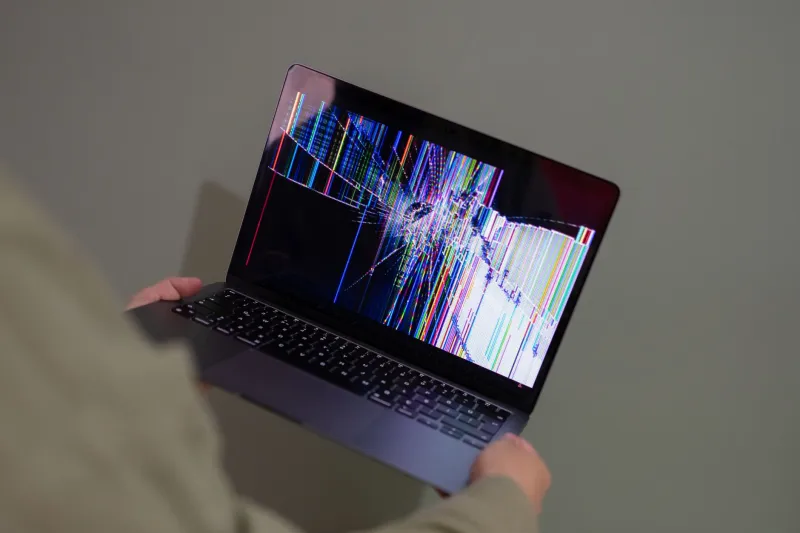
- Persistent lines, flickering, or color distortion that appears consistently across all applications
- Screen artifacts — strange pixels, geometric patterns, or corrupted rendering — particularly during graphics-intensive tasks
- A display that goes black intermittently while the system continues running
- Distortion that follows the system when connected to an external monitor (suggesting a GPU issue rather than a faulty screen)
A failing graphics card or a damaged GPU can cause cascading system instability if left in service. For laptop users, a flickering or dim display may also indicate a failing backlight or a damaged display cable — both of which require professional disassembly to address safely.
Knowing When to Call a Professional
Not every computer problem warrants an immediate service call. Slow startup times, for example, can often be improved by disabling startup programs or adding a solid-state drive. A single software crash is rarely cause for alarm.
However, when the symptoms described above are present — particularly in combination — they represent hardware-level problems that software tools and DIY fixes cannot reliably resolve. Attempting to push through these warning signs risks transforming a manageable repair into a catastrophic failure.
At MEC Computer, our diagnostic process is designed to identify the precise source of a problem before recommending any course of action. We believe in transparent assessments and solutions that serve our customers' best interests — not unnecessary replacements or inflated repair bills.
If your machine is exhibiting any of these warning signs, do not wait for a complete failure. Reach out to our team for a professional evaluation. Catching a problem early is almost always less expensive — and far less stressful — than dealing with the consequences of a system that has already failed.